
Part Number
Computer Parts Explained: Part Numbers, Drives, and Connectors
Whether you are upgrading a laptop, building a desktop, or simply trying to order the right replacement part, a little terminology goes a long way. In this article we cover four of the most common questions our customers ask: what a part number is and where to find it, what sets SATA apart from SAS, when to choose an SSD over an HDD, and which SSD format actually fits your machine.
What Is a Part Number, and Where Do I Find It?
A part number — sometimes abbreviated P/N — is a unique identifier assigned by the manufacturer to a specific component. Think of it as a product's fingerprint: two parts that look nearly identical on the outside can have completely different part numbers because one supports a higher voltage, fits a slightly different chassis, or uses a different connector pinout.
You will find the part number printed on the label affixed to the component itself — usually on the back or underside of a hard drive, RAM stick, or battery. On plastic parts (keyboard frames, hinges, bezels), the number is often moulded directly into the plastic rather than printed on a sticker, so look for small raised or recessed digits inside the casing.
If the sticker is worn or the moulded text is hard to read, you can also look up the part number through your device's service manual, which most major manufacturers (Dell, HP, Lenovo) publish for free on their support websites. A serial number lookup on the manufacturer's site will often return a full parts list as well.
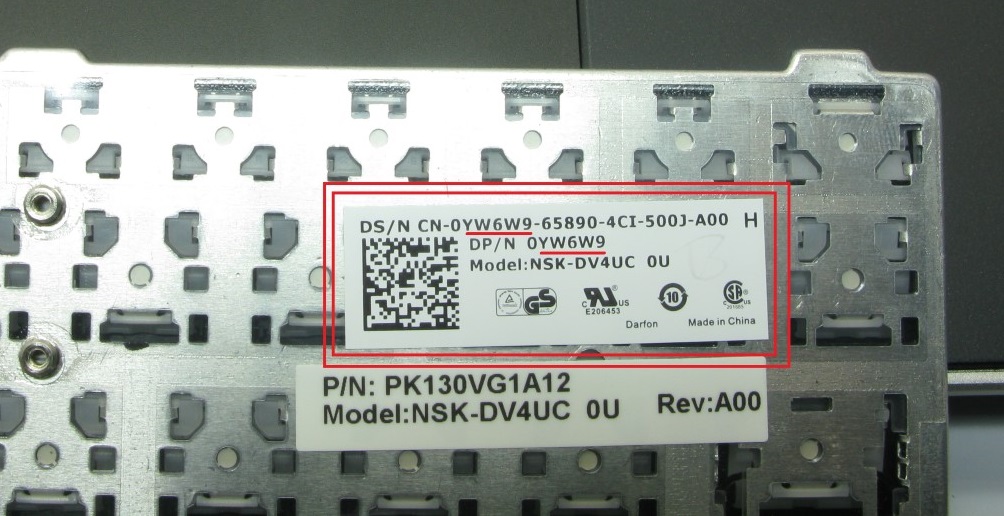
The part number is printed on the label or moulded into the plastic — always check before ordering.